
How to stop Facebook from announcing your birthday to friends

There is something nice about waking up to birthday messages from friends and family, but there are also moments when you would rather keep things quiet, avoid the flood of notifications, and go through your day without the pressure of replying to dozens of messages, which is why many people start looking for a way to stop Facebook from broadcasting their birthday to everyone on their list.
The platform, owned by Meta Platforms, is designed to encourage interaction and engagement, so birthday reminders are turned on by default, and unless you change your privacy settings, your friends will be notified when your special day arrives.
Why Facebook Announces Your Birthday In The First Place
Facebook collects your date of birth when you create an account, and this information is used for several purposes including age verification, personalized experiences, and of course, reminding your friends when to celebrate you, which explains why so many people receive notifications prompting them to send birthday wishes.
While this feature can help people stay connected, it can also feel overwhelming or unnecessary, especially if you value your privacy or simply prefer a low key celebration without the spotlight.
The Simple Way To Hide Your Birthday On Facebook
The easiest way to stop Facebook from announcing your birthday is to change who can see your date of birth, since the visibility of that information directly affects whether others receive notifications about it.
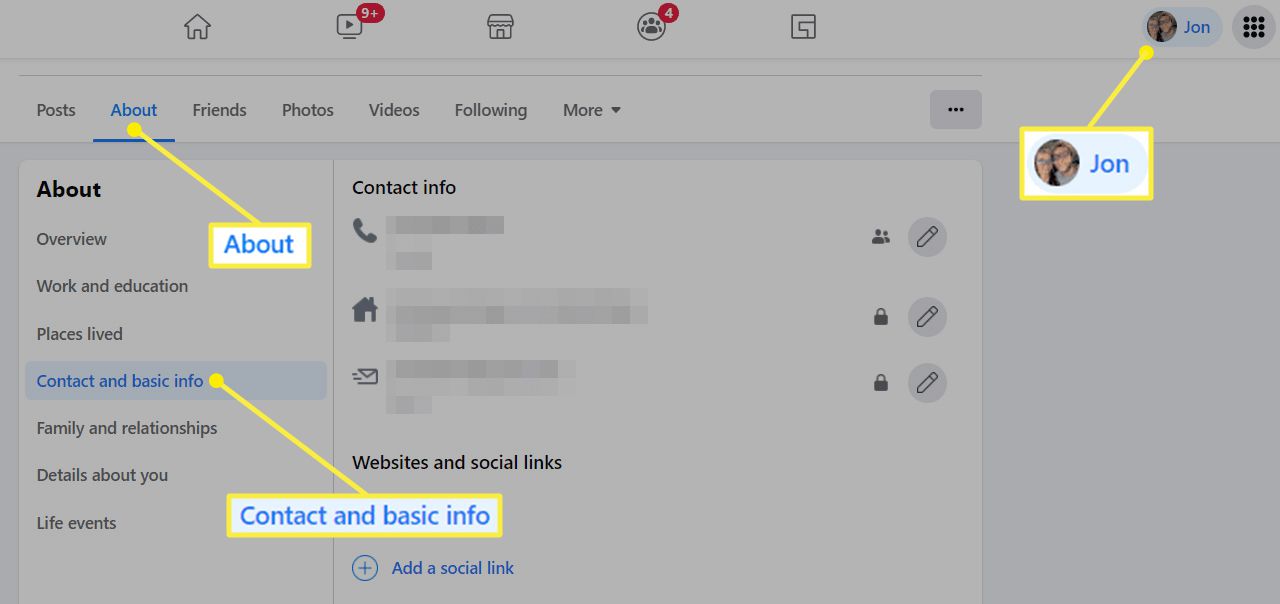
Start by opening your Facebook app or logging into your account through a browser, then go to your profile page where your personal details are displayed, and look for the section that shows your birthday information.
Once you find it, tap or click on the edit option, which will allow you to adjust the privacy settings for both your birth date and your birth year, and this is where you can take control of who sees that information.
Set Your Birthday Visibility To “Only Me”
To completely stop birthday notifications from being sent to your friends, you need to change the visibility of your birthday to “Only Me,” which effectively hides it from everyone else on the platform.
When you apply this setting, Facebook will no longer use your birthday as a trigger for notifications to your friends, and your timeline will remain free from the usual birthday posts unless you choose to share something yourself.
This option gives you full control over your privacy without affecting other parts of your account, making it a straightforward and effective solution.
You Can Also Limit Visibility Instead Of Hiding Completely
If you do not want to completely hide your birthday but still want to reduce the number of people who see it, you can choose a more limited audience such as “Friends” or a custom list that includes only close contacts.
This approach allows you to receive birthday wishes from a smaller group of people while avoiding the overwhelming influx of messages that often comes with a fully public or widely shared birthday.
It is a flexible option that lets you balance privacy with connection based on your personal preference.
Adjust Timeline Posting Settings For Extra Control
Even after hiding your birthday, you might still want to manage who can post on your timeline, since some people may remember your birthday independently and decide to post messages anyway.
To control this, go to your settings and find the timeline and tagging section, where you can restrict who is allowed to post on your timeline or review posts before they appear publicly.
By enabling review options, you can approve or decline birthday messages before they show up, giving you an extra layer of control over what appears on your profile.
Turning Off Notifications For Yourself
Another step you can take is to manage your own notifications, especially if you do not want to be reminded of your birthday activity on the platform.
Within the notification settings, you can adjust how Facebook notifies you about events and interactions, which helps create a quieter and more controlled experience during your birthday.
This does not affect what others see, but it does help you avoid unnecessary distractions.
What Happens After You Hide Your Birthday
Once you change your birthday visibility to “Only Me,” the change takes effect immediately, and your friends will no longer receive reminders or prompts to send you birthday wishes.
Your profile will also no longer display your birthday to others, which means that unless someone already knows your date or has saved it elsewhere, your birthday will pass quietly on the platform.
It is worth noting that this setting does not delete your birthday from Facebook’s system, but simply hides it from public view.
Things To Keep In Mind Before Making The Change
Before you decide to hide your birthday, consider whether you might miss the messages and interactions that come with it, as for some people, those greetings are a meaningful part of their day.
If you are unsure, you can test the setting for one year and see how it feels, since you can always change it back later if you decide you want to receive birthday wishes again.
Facebook gives you the flexibility to adjust your settings at any time, so you are not locked into a permanent decision.
Final Thoughts On Controlling Your Facebook Privacy
Social media platforms are designed to encourage sharing and interaction, but that does not mean you have to participate in every feature, especially when it comes to personal information like your birthday.
By taking a few minutes to adjust your settings, you can decide exactly how much of your life you want to share and with whom, which helps you create a more comfortable and intentional online experience.
Whether you prefer a quiet birthday or a small circle of well wishes, the choice is entirely yours, and knowing how to control these settings puts you in charge of your digital presence in a way that aligns with your preferences.


